Saturday, September 26, 2015

Primary Story Elements with ScribbleMyStory

(Originally posted December 17, 2014 on Greenwood 50's Technology Leaders and Coaches In Action! blog at: http://kidblog.org/stls/823673c8-64ee-4e47-81b0-aca3e1d5b807/primary-story-elements-with-scribblemystory/ )
---------------------------------------------------------------------------------------------------------------------


Integrating technology with curriculum in a creative manner is one of my goals as a School Technology Leader.  I am always striving to find ways of doing so in a manner that reinforces learning rather than serves as a game-like activity at the end of a lesson.  In doing this, I hope to also model to classroom teachers how they can use technology as a teaching and creating tool and not an afterthought because they are being asked to incorporate more technology in their classrooms.

To this extent, Kindergarten is both an open landscape of possibilities and a unique challenge as most students are either completely new to technology or have limited experience with it.  iPads are a wonderful tool to start with, however, and I have been searching and thinking and biding my time to develop a suitable lesson for incorporating iPad technologies in a creation project that would produce an end product within a limited time frame and with such young students.  With ScribbleMyStory, I was able to do just that.


Kindergarten, as well as first and second grades, have been exploring story elements in the library for the past few weeks.  This particular lesson was the opening lesson about characters.
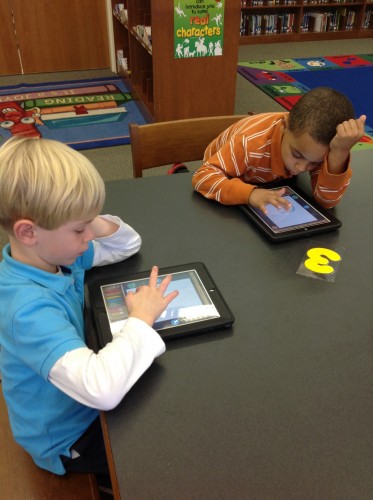
 
 
ScribbleMyStory, a free book creation app, was the application.  After a short discussion about books and reading and characters and the other things that make up stories, I asked students to wear two hats - that of illustrator and main character.  The ScribbleMyStory app was perfect for this lesson as well as for the young age level.  It allowed freedom of creation and design within the confines of a short, 3-page, pre-written story.  All students had to focus on was their main character, which was the exact purpose of the lesson.  The ScribbleMyStory app allowed them to focus on one story element, but still create a self-manipulated, individually creative product within that focus.
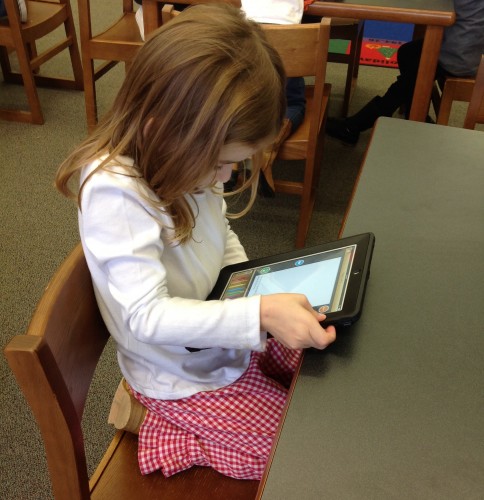
 
 
Students were asked to use the “All About Me” book template in ScribbleMyStory to tell a story about their main character - themselves.  We talked about our artistic license and how we as both the illustrator and the main character could be anything we want to be, in the realm of a character.  We could be human or animal or object. We could have brown hair or pink hair or purple, polka-dotted, paisley hair.  We could be a boy, a girl, a unicorn. The possibilities were limitless.  They understood that they were in control and they harnessed that control with a creative verve that easily allowed me to assess how well they completely understood the concept of character and of creating a character of their own.
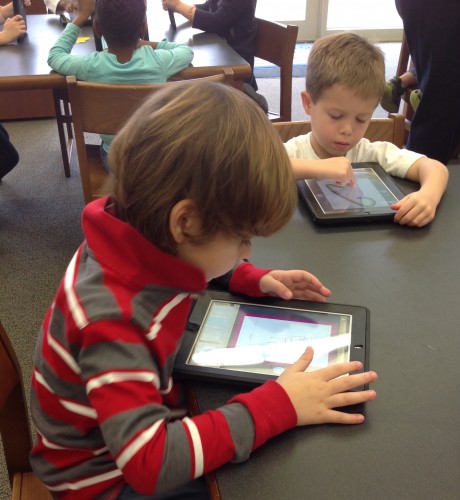
 
ScribbleMyStory is a awesome app that my students have revisited on a number of occasions since this initial lesson.  The free version features 4-5 short book templates similar to the “Just About Me” template plus there is a longer blank book template that allows the user to both illustrate and write the story.  The app is perfect for the primary age level as it is easy to navigate, simple, and straightforward.  As always, students are quick to learn the nuances of manipulating colors, pulling in clip art, etc., which only allowed their creativity to soar.

In addition to my professional goals in this position, I have a personal goal as a media specialist and a teacher and that is to be open to learning as much from my students as I teach them.  Teaching and learning are reciprocal relationships, after all, and as educators, we simply have to have our eyes and our minds open to the daily lessons our students teach us. We have to be able to recognize the lesson and be able to relate it to what we need to learn.
What I learned from my students with this project was a reinforcement of what they had already taught me...if you put technology in student hands, they will create and learn in ways you could never have planned.  They will use critical thinking to figure out how to use the technology application and how to create tangibly the thoughts and images they have in their own imaginations.
 
And then... well, then they will absolutely amaze you with those wonderful imaginations, their sincere creations, and the sheer depth of their understanding.

Newsela: Read carefully. Think critically. Be worldly. ... Reading Comprehension + Current Events.

(Originally posted November 21, 2014 on Greenwood 50's Technology Leaders and Coaches In Action! blog at: http://kidblog.org/stls/823673c8-64ee-4e47-81b0-aca3e1d5b807/newsela-for-nonfiction-reading-comp-current-events/ )
--------------------------------------------------------------------------------------------------------------------


Each of my goals as School Technology Leader revolve around technology integration and helping teachers embed technology in their classrooms.  One strategy I've identified in accomplishing this goal is to lead by modeling technology in my library classroom.

In writing lesson plans this past week, I focused my 3rd, 4th, and 5th grade lessons around Newsela - the Web 2.0 tool I recently featured in a tech tips for classroom integration newsletter.  What I've learned is that, when you put technology in a student's hands, they will take it, run with it, and more often than not, find that they enjoy doing things and accomplishing skills they might not enjoy nearly as much (or at all) in a more traditional format.

The simple act of putting the technology in their hands is the best springboard to active learning. And Newsela is the perfect example to illustrate that theory.


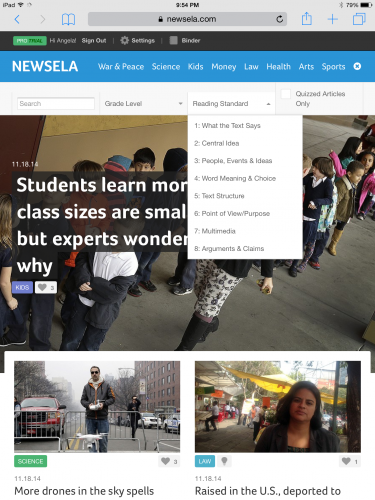
Newsela and Newsela Elementary are free Web 2.0 tools that presents a current events/news platform with leveled nonfiction reading and assessment quizzes to meet all Common Core ELA reading standards.  As a teacher, you simply sign up for a free account (or a free Pro trial) and create your virtual classroom.  Since Newsela is geared towards students in grades 3-12, I decided to use it in my elementary library with grades 3-5 as a tool to gauge nonfiction reading skills as well as provide practice honing those skills.


One of the true beauties of Newsela is in it's search capabilities.  When you begin searching for articles to assign to your class, you not only have the traditional search parameters (category, keyword, grade level) but you also have the ability to filter those results to only include articles with quizzes attached.  Even further, you can choose the Common Core ELA Standard you want the quiz to test!  Quizzes are available that focus on what the text says; the central idea; people, events, and ideas; word meaning and choice; text structure; point of view and purpose; multimedia; and arguments and claims.

Basically, you can personalize Newsela to fit the needs of your students so that they gain purposeful practice on skills they need to improve while exploring current events and having meaningful conversation about global issues in the news.


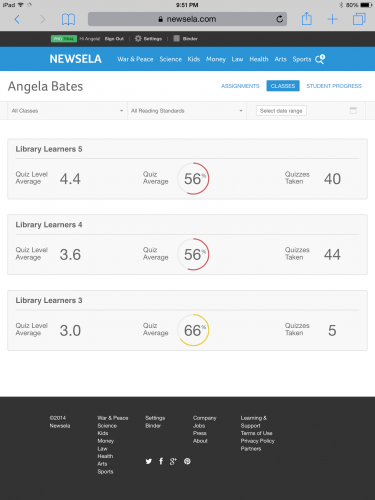
What I found with my classes was that students not only completed the articles I had assigned, but many also used remaining class time to search for more articles that they were interested in reading for pleasure as well as for information.  Students also liked being able to instantly see their scores and track their progress in the "Binder" tab.  Newsela worked beautifully with each of the three grade levels and proved to be engaging and challenging.

One of the many advantages to classroom teachers is that Newsela is a Web 2.0 tool that can be used from desktops, laptops, iOS and Android devices, or any device with web browsing capabilities.

Once the virtual classroom is set up and articles are assigned, teachers can allow students to access the site on their classroom computers/laptops as time allows.  Just assigning one to two articles per week gives students meaningful, engaging, purposeful, and relevant educational activity for extra class time or center time, that is richly embedded in technology and offers reading comprehension practice and assessment as well as a platform for current events conversation and discussion.  It's a win/win for students and teachers.

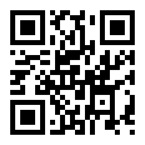
To set-up/use Newsela go to Newsela at https://newsela.com or scan the QR code below:

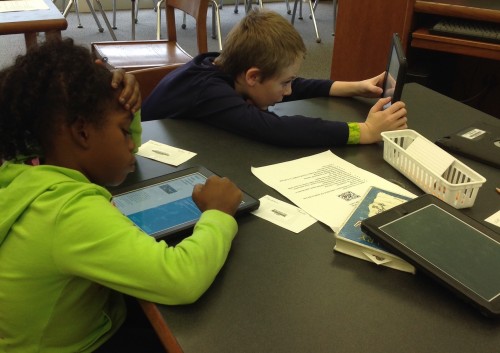
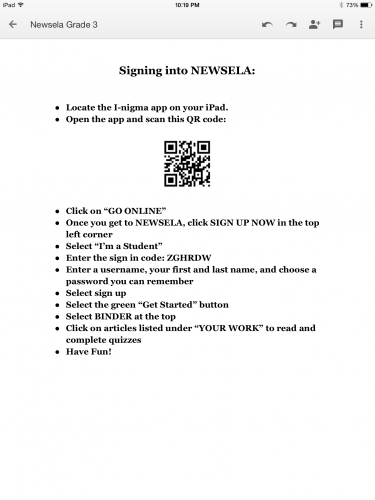
Click "Sign Me Up" in the top left corner, choose "I'm a Teacher", complete the simple registration, and create your classes in the "Settings" tab on the top menu bar.  Newsela generates a "Sign Up Code" which students need in order to create an account and join the class.  The sign up code is all they need.  Registration DOES NOT require an email account.  To make things even easier for my students, I printed a brief sheet of instructions which included the QR code to get to Newsela and the class sign up code and placed a sheet on each table.


After your class is set up, simply use the search options to locate and assign articles.  After your students have registered with their specific class code, you are able to see each student and follow their progress, including the articles they have completed and their corresponding scores on those articles.  You can also access and review overall class progress.


I found Newsela to be a wonderful tool for incorporating current events, promoting nonfiction reading, and strengthening reading comprehension skills.  I hope you'll give it a try!

Reading Comprehension with Inference Ace

(Originally posted Nov. 7, 2014 on the Greenwood 50's Technology Leaders and Coaches In Action! blog at: http://kidblog.org/stls/823673c8-64ee-4e47-81b0-aca3e1d5b807/inference-ace/ )
---------------------------------------------------------------------------------------------------------------------


One of my goals as School Technology Leader and media specialist is to explore new technology options for curriculum integration.  To do so most effectively, I know I need to explore and experiment with technologies within the library information literacy curriculum as related to curriculum standards.  This past week I did just that with an iOS app created to help students with reading comprehension and deep reading by allowing specific and targeted practice with making inferences

Inference Ace is available for the iPad in both free and paid versions.  The free version I used allows students to complete 4 levels at 10 questions per level. The first level questions deal with when; the second level, where; the third, what; and the fourth, who.


I was impressed with the app because it builds reading comprehension skills in a fun, game-like format, which typically appeals to students at all applicable grade levels.  I used Inference Ace with my 3rd and 4th grade classes this week after a brief review of "Making Predictions" and a focused lesson on "Inference."  The questions were challenging for some of the third graders, but not so challenging that they could not complete them successfully when they concentrated or were given guided assistance.  The fourth grade classes enjoyed the app even more and were still challenged by the questions, though I did have a few students who successfully made it through all 4 levels with very few missed questions.

Overall, the lesson and the use of the technology versus any kind of written worksheet or practice was a great success.  As a matter of fact, since teaching these classes earlier this week, I have had students on other grade levels ask if they were going to be able to use the same app in their class!

Next week I intend on reviewing inference with third grade, in order to emphasize the importance of the skill and allow them to practice with the app again, as well as possibly move on to Inference Ace 2, which is more challenging.  Fourth graders will review and advance to Inference Ace 2.  In addition to those classes, I will be reviewing inference with my fifth grade students this week and having them begin with Inference Ace and then move on to Inference Ace 2 if they successfully complete the first 4 levels.

Being able to successfully make inferences and use deductive thinking while reading is such an important reading skill to propel comprehension and understanding.  While quiz-like apps such as Inference Ace and Inference Ace 2 might not always be preferable to creation apps, in this case I think Inference Ace was both appropriate and successful in illustrating to students what it means to make inferences by isolating the skill in short, succinct questions.

So in this instance of purposefully exploring and experimenting with technologies to enhance curricular content and practice, I feel I succeeded, which means, of course, that my students succeeded.  And that is always my goal.

Monday, January 19, 2015

MLK, Old Crow Medicine Show, and Information Literacy

What do Martin Luther King, Jr., Old Crow Medicine Show, and information literacy have in common?  A lot, if you use a multidisciplinary approach to teach fact verification and information seeking skills through music and technology.

I have always been a huge music fan and I've always loved all kinds of music.  Most often I'm drawn to a song because of the lyrics.  The first time I heard Old Crow Medicine Show's song "Motel in Memphis" - a song about the assassination of Dr. Martin Luther King, Jr. - I knew that I wanted to use it in a lesson someday, somehow. The song lyrics touched me in a way that made me see the assassination of this man in a way I had not before.  The mere words to the song brought a piece of history to life. I hoped it would do the same for my students - make them view the life and death of Dr. Martin Luther King, Jr. in a way that would provoke a new appreciation for his legacy and for the many reasons he is celebrated and recognized with a national holiday.

But I don't teach music and I don't teach history.  I am a media specialist.  I teach information literacy skills - how to locate information, how to evaluate information and authenticate sources, how to be responsible users of information, and how to learn from the information we find.  What could that possibly have in common with this song, the man, and the fact that we celebrate his life with a national holiday?  

Everything...if you go about it the right way.


I started with the song lyrics that had so moved me and thought about how, like myself, my students were not present when Martin Luther King was alive nor when he was so brutally murdered.  Like myself, those lyrics could bring new meaning to a part of history they had often heard about, but never experienced.  And so I did what I love to do and found a way to incorporate technology and music to teach a lesson about a great man using a thoughtful song with historically specific lyrics to engage my students in a information seeking/fact authentication and verification mission. 

I started by using "Motel in Memphis" as the background music for an Animoto photo montage video depicting Dr. Martin Luther King, Jr.'s life, assassination, and funeral. The lyrics to the song were printed on a worksheet for students.  Third and fourth grade students were asked five questions specific to facts in the lyrics and instructed to use research and fact verification skills to answer and/or verify the answer to those questions.  

I allowed a little more autonomy with my fifth-graders, asking them to use information from the lyrics to learn more about specific details illustrated by the song.  For example, one line from the song reads, "Were you there with Mahalia wailing at the funeral?"  Students were to use the information in that lyric to learn by using their research skills that the "Mahalia" referred to was Mahalia Jackson, a gospel singer and friend of Dr. King, who sang at his funeral service.

Through both of these activities, students learned multiple cross-disciplinary lessons.

  • They learned that music and music lyrics tell a story and that sometimes that story is a historically factual one.  
  • They learned about a great man by starting from the day he was assassinated and working back through his life to discover detailed information about the equality and civil rights he fought for.
I used technology and music as tools to paint the picture for them and they used technology through online research to locate, verify, evaluate, and develop what I know was a greater understanding of the history and the man.

But most importantly, they used their own natural curiosity and inquisitive behavior as a catalyst for responsible information seeking and fact verification. 

What I learned was that I wasn't alone in being touched by the song, I wasn't the only one to see history from a different perspective because of it's lyrics, and that given the opportunity to interpret factual and artistic expression through music lyrics, students were led to not only find and verify the factual information, but also to dig even deeper to satisfy their personal curiosity about the facets of this particular history that most fascinated them.


Tuesday, November 25, 2014

Learning Technology Organically

Working with K5 kindergarten students on iPads is always one of the most incredible things.  To see these young, innocent beings willingly and excitedly dive into technology is amazing.  They aren't afraid.  They haven't learned that fear, yet.  They take chances and they make mistakes.  But it doesn't phase them.  They simply start over and learn from what they did wrong.  They're fearless in the best ways - wide-eyed, excited to learn, and innocent.

I love working with kindergartners and technology - particularly iPads, which are so wonderfully tactile and make the process and experience of learning incredibly multidimensional.  In my opinion, they represent hands-on learning as an active pedagogy.  Students are active in their learning - engaged, involved, and present, using higher order thinking skills easily aligned with Bloom's Taxonomy.  In later projects we will work towards higher levels of the cognitive process with creation projects and self as well as peer evaluations.

But today...well, today we played.  We played productively and learned how the iPad works. We learned tips and tricks to navigating the technology.  We learned how we should use it respectfully and responsibly.  We learned by actively doing.  And then we learned through explorative play, choosing any app and practicing our navigation skills until we discovered the app we most liked and wished to explore further.

My favorite part of a lesson like this is watching how each of these little learners "play" with the iPad - from the way they learn to use their fingers to navigate the touch screen to the apps they are most attracted to.

Learning is a process.  It is planned.  It is discovered.  And it is created.  It's a pretty special process to participate in and an even more remarkable one to witness when it happens organically.

Monday, November 24, 2014

A picture is worth a thousand words... and a little extra Thanksgiving gratitude.

It's a short holiday week, but we are still learning and using technology to express familiar ideas in not quite so traditional ways.  Today my 3rd and 4th grade learners worked on iPads to find ways to express the things they are most thankful for during this Thanksgiving season.  In planning this lesson I thought of the myriad of ways students are often asked to express themselves and/or present their ideas.  For this short project, I wanted the focus to truly be on them.  I wanted them to be able to express their ideas in as individual a manner as possible.  What better way than a self-portrait?  We used aTypo Picture, a free and simple to use word photo app, to create self-portraits highlighting the things they are most grateful for this Thanksgiving.  This was one of my favorites, from a very expressive and creative 4th grader...